FieldValue
Package@cometchat/chat-uikit-react
FrameworkAstro (with @astrojs/react islands)
ComponentsCometChatConversations, CometChatMessageHeader, CometChatMessageList, CometChatMessageComposer
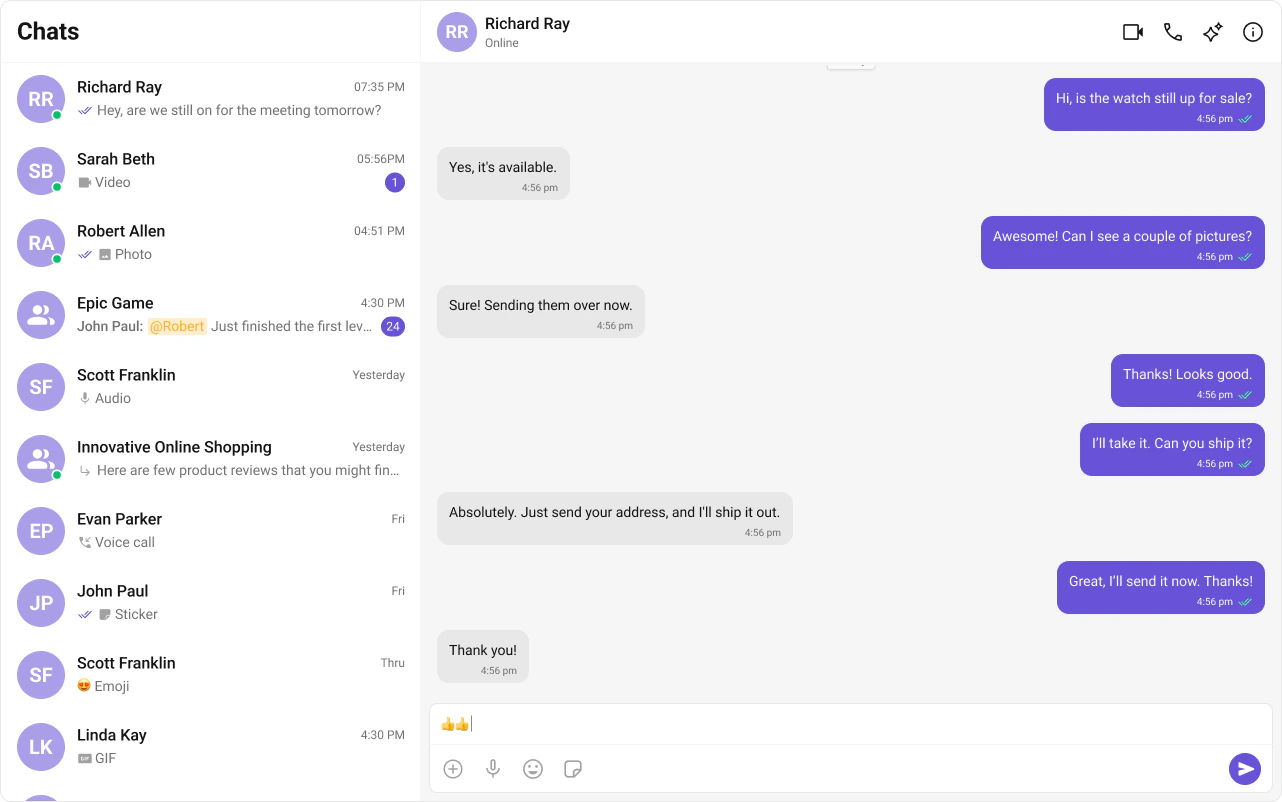
LayoutTwo-panel — conversation list (left) + message view (right)
PrerequisiteComplete Astro Integration Steps 1–5 first
SSRclient:only="react" directive — CometChat requires browser APIs
PatternWhatsApp Web, Slack, Microsoft Teams
This guide builds a two-panel chat layout — conversation list on the left, messages on the right. Users tap a conversation to open it. This assumes you’ve already completed Astro Integration (project created, React added, UI Kit installed).

What You’re Building

Three sections working together:
  1. Sidebar (conversation list) — shows all active conversations (users and groups)
  2. Message view — displays chat messages for the selected conversation in real time
  3. Message composer — text input with support for media, emojis, and reactions

Step 1 — Create the React Island

Create a ChatApp component inside src/components/. This is a React island that handles init, login, and renders the full chat experience.
src
components
ChatApp.tsx
ChatApp.css
ChatApp.tsx
import { useEffect, useState } from "react";
import {
  CometChatConversations,
  CometChatMessageComposer,
  CometChatMessageHeader,
  CometChatMessageList,
  CometChatUIKit,
  UIKitSettingsBuilder,
} from "@cometchat/chat-uikit-react";
import { CometChat } from "@cometchat/chat-sdk-javascript";
import "@cometchat/chat-uikit-react/css-variables.css";
import "./ChatApp.css";

const COMETCHAT_CONSTANTS = {
  APP_ID: "",    // Replace with your App ID
  REGION: "",    // Replace with your Region
  AUTH_KEY: "",  // Replace with your Auth Key (dev only)
};

const UID = "cometchat-uid-1"; // Replace with your actual UID

export default function ChatApp() {
  const [user, setUser] = useState<CometChat.User | undefined>(undefined);
  const [selectedUser, setSelectedUser] = useState<CometChat.User | undefined>(undefined);
  const [selectedGroup, setSelectedGroup] = useState<CometChat.Group | undefined>(undefined);

  useEffect(() => {
    const UIKitSettings = new UIKitSettingsBuilder()
      .setAppId(COMETCHAT_CONSTANTS.APP_ID)
      .setRegion(COMETCHAT_CONSTANTS.REGION)
      .setAuthKey(COMETCHAT_CONSTANTS.AUTH_KEY)
      .subscribePresenceForAllUsers()
      .build();

    CometChatUIKit.init(UIKitSettings)
      .then(() => {
        console.log("Initialization completed successfully");
        CometChatUIKit.getLoggedinUser().then((loggedInUser) => {
          if (!loggedInUser) {
            CometChatUIKit.login(UID)
              .then((u) => {
                console.log("Login Successful", { u });
                setUser(u);
              })
              .catch((error) => console.error("Login failed", error));
          } else {
            console.log("Already logged-in", { loggedInUser });
            setUser(loggedInUser);
          }
        });
      })
      .catch((error) => console.error("Initialization failed", error));
  }, []);

  if (!user) return <div>Initializing Chat...</div>;

  return (
    <div className="conversations-with-messages">
      <div className="conversations-wrapper">
        <CometChatConversations
          onItemClick={(activeItem) => {
            let item: any = activeItem;
            if (activeItem instanceof CometChat.Conversation) {
              item = activeItem.getConversationWith();
            }
            if (item instanceof CometChat.User) {
              setSelectedUser(item);
              setSelectedGroup(undefined);
            } else if (item instanceof CometChat.Group) {
              setSelectedUser(undefined);
              setSelectedGroup(item);
            } else {
              setSelectedUser(undefined);
              setSelectedGroup(undefined);
            }
          }}
        />
      </div>

      {selectedUser || selectedGroup ? (
        <div className="messages-wrapper">
          <CometChatMessageHeader user={selectedUser} group={selectedGroup} />
          <CometChatMessageList user={selectedUser} group={selectedGroup} />
          <CometChatMessageComposer user={selectedUser} group={selectedGroup} />
        </div>
      ) : (
        <div className="empty-conversation">Select a conversation to start chatting</div>
      )}
    </div>
  );
}
How it works:
  • Init and login happen inside useEffect — the component only renders chat UI after login resolves.
  • When a conversation is tapped, the User or Group is extracted from the Conversation object.
  • selectedUser / selectedGroup state drives which chat is displayed — pass either user or group to the message components, never both.

Step 2 — Render the Astro Page

Import the island and hydrate it client-side using client:only="react".
src/pages/index.astro
---
import ChatApp from "../components/ChatApp.tsx";
import "../styles/globals.css";
---

<html lang="en">
  <head>
    <meta charset="utf-8" />
    <title>CometChat + Astro</title>
  </head>
  <body>
    <ChatApp client:only="react" />
  </body>
</html>
The client:only="react" directive ensures the component skips SSR entirely and only renders in the browser — required because CometChat needs window and WebSocket.

Step 3 — Run the Project

npm run dev
You should see the conversation list on the left. Tap any conversation to load messages on the right.

Next Steps

Theming

Customize colors, fonts, and styles to match your brand

Components Overview

Browse all prebuilt UI components

Astro

Astro Integration

Back to the main setup guide

Core Features

Chat features included out of the box