

AI Integration Quick Reference
AI Integration Quick Reference
| Field | Value |
|---|---|
| Package | @cometchat/chat-uikit-react |
| Framework | React Router |
| Components | CometChatConversations, CometChatCallLogs, CometChatUsers, CometChatGroups, CometChatMessageHeader, CometChatMessageList, CometChatMessageComposer |
| Layout | Tabbed sidebar (Chats, Calls, Users, Groups) + message view |
| Prerequisite | Complete React Router Integration Steps 1–5 first |
| SSR | Lazy import + mounted check — CometChat requires browser APIs |
| Pattern | Full-featured messaging app with multiple sections |
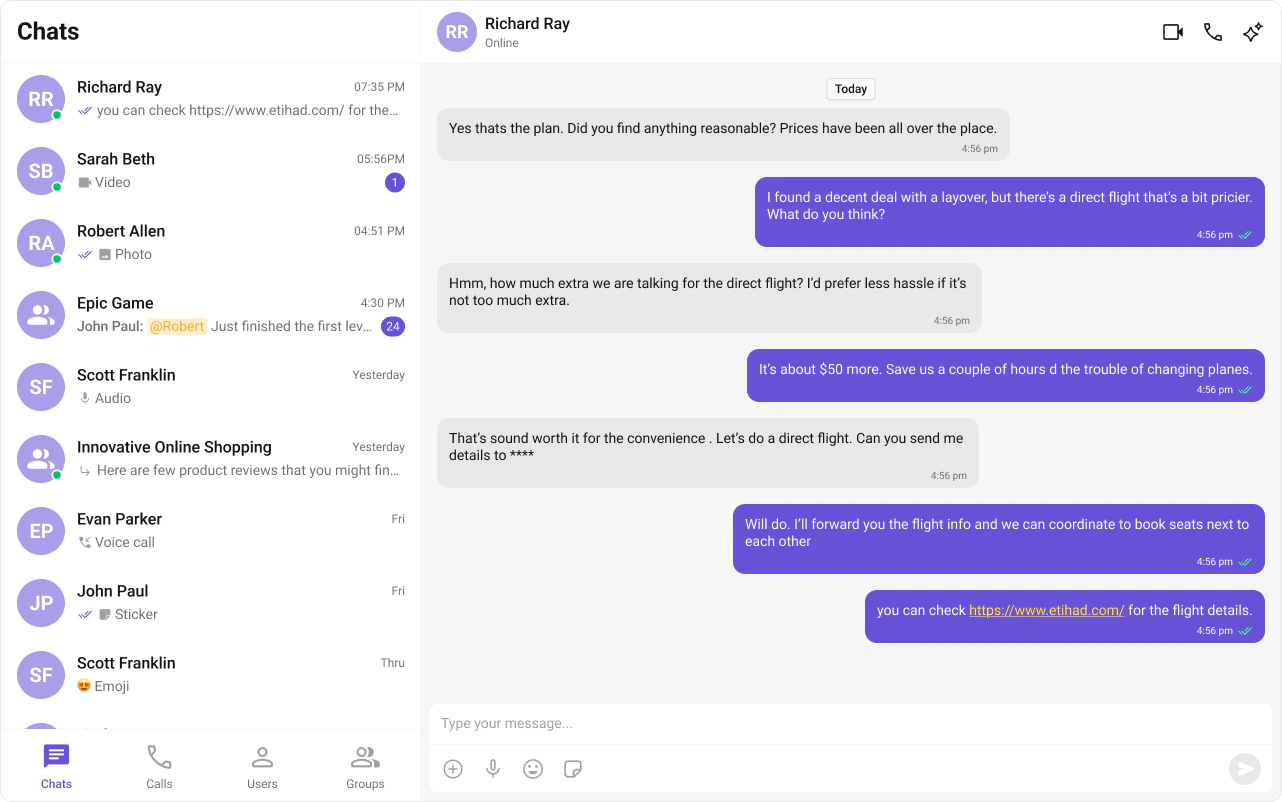
What You’re Building
Three sections working together:- Tab bar — switches between Chats, Calls, Users, and Groups
- Sidebar — renders the list for the active tab
- Message view — header + messages + composer for the selected item
Step 1 — Create the Tab Component
src
app
CometChatTabs
CometChatTabs.tsx
CometChatTabs.css
public/assets/. Download them from the CometChat UI Kit assets folder on GitHub.
public
assets
chats.svg
calls.svg
users.svg
groups.svg
- TypeScript
- CSS
CometChatTabs.tsx
Step 2 — Create the Sidebar Component
The sidebar renders the list for whichever tab is active, plus the tab bar at the bottom.src
app
CometChatSelector
CometChatSelector.tsx
CometChatSelector.css
- TypeScript
- CSS
CometChatSelector.tsx
Step 3 — Create the CometChatNoSSR Component
This component handles init, login, and renders the full tabbed chat experience. It runs client-side only.src
app
CometChatNoSSR
CometChatNoSSR.tsx
CometChatNoSSR.css
- TypeScript
- CSS
CometChatNoSSR.tsx
Step 4 — Disable SSR and Add the Route
CreateCometChat.tsx inside the routes folder. This uses lazy loading and a mounted check to ensure CometChat only runs client-side.
routes/CometChat.tsx
routes.ts
window, WebSocket, document). The lazy import + mounted check ensures the component only renders on the client.
Step 5 — Run the Project
- npm
- pnpm
- yarn
/chat (e.g. http://localhost:5173/chat). You should see the tab bar at the bottom of the sidebar. Switch between Chats, Calls, Users, and Groups — tapping any item loads the message view on the right.
Next Steps
Theming
Customize colors, fonts, and styles to match your brand
Components Overview
Browse all prebuilt UI components
React Router Integration
Back to the main setup guide
Core Features
Chat features included out of the box